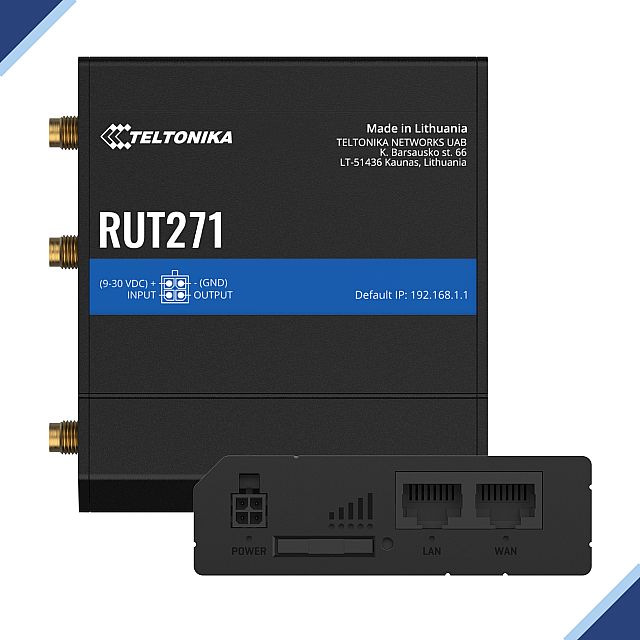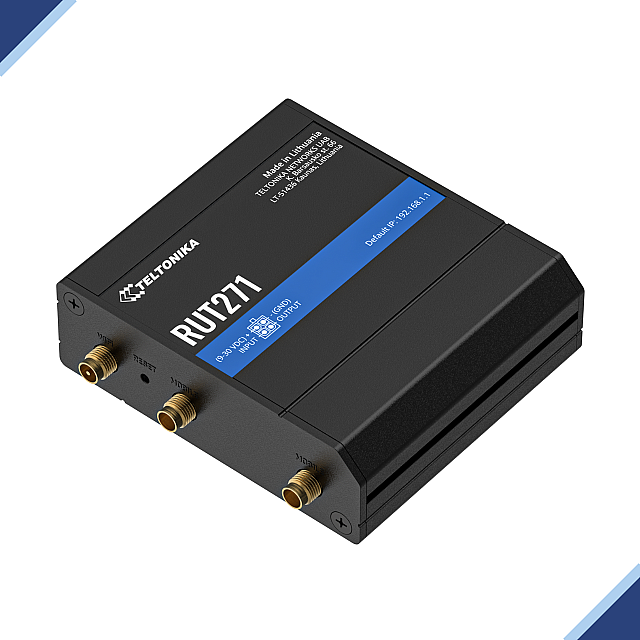










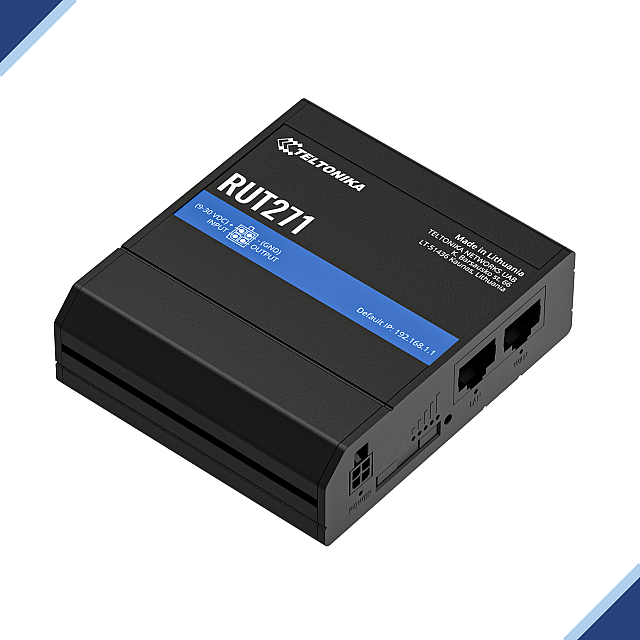
Teltonika RUT271: RedCap 5G WiFi Router With WAN Failover
- Stock: Out of Stock
- Brand: Teltonika Networks
- Model: RUT271
- Weight: 130.00g
- Dimensions: 83.00mm x 25.00mm x 74.00mm
- MPN: RUT271
Available Options
Included in the Price of this Product is the WEEE Recycling Charge.
Power Your Connectivity with the Speed and Simplicity of 5G RedCap: Meet the Teltonika RUT271 — a compact, industrial-grade 5G router designed to deliver next-generation connectivity without the complexity or cost of full 5G. Whether you’re managing remote assets, deploying smart infrastructure, or ensuring reliable backup for critical systems, the RUT271 is built to keep your operations running smoothly and securely.
Key Features & Benefits
RedCap 5G & 4G LTE Compatibility: Powered by advanced 5G sub-6GHz technology (up to 223 Mbps DL & 123 Mbps UL) and backward-compatible with 4G LTE CAT 4, it future-proofs your network while maintaining reliable performance on existing technologies. Benefit: Enjoy seamless high-speed connectivity no matter your network environment, reducing latency and maximizing throughput even in challenging locations.
Wi-Fi 4 Access Point: Supports up to 50 simultaneous wireless connections—ideal for small offices, remote kiosks, or field operations. Benefit: Enhance productivity by providing stable Wi-Fi access wherever you need it, without extra hardware.
Dual 10/100 Ethernet Ports: Offers versatile wired connectivity with auto MDI/MDIX, ensuring easy integration into your existing network infrastructure. Benefit: Simplify deployments and ensure continuous operation with an always-on Ethernet link.
WAN Failover & Network Resilience: Automatically switches to backup connections when the primary network fails, keeping your operations online round the clock. Benefit: Minimize downtime and avoid costly interruptions, crucial for mission-critical applications.
Advanced Security & Management with RutOS: Featuring robust VPN support, firewall protection, and intuitive remote management, the RUT271 secures your data and simplifies network oversight. Benefit: Save time and money with centralized control and peace of mind knowing your network is protected.
SIM Flexibility & Auto APN: With dual-SIM support (including eSIM) and auto APN detection, managing your carrier connections becomes effortless. Benefit: Achieve optimum network performance and maintain continuous connectivity even when switching SIMs or operators.
What Sets It Apart
The Teltonika RUT271 isn’t just another router—it combines innovative RedCap 5G technology, industrial durability, and a user-friendly interface to deliver unparalleled performance in harsh environments. Its plug-and-play simplicity and versatile networking options make it the smart choice for businesses seeking reliable, scalable connectivity.
Empower your network. Elevate your performance. Choose the RUT271 today.
Downloads
- Download Technical Specification (PDF)
- Download the Latest Firmware
- Quick Start Guide: EN (Web Page)
- User Manual: EN (Web Page)
What’s In the Box?
Standard Goodies Inside:
- The RUT271 RedCap 5G Router Unit
- 9W PSU
- 2x Mobile 5G antennas (swivel, SMA male)
- 1x Wi-Fi antenna (swivel, RP-SMA male)
- Ethernet cable (1.5 m)
- SIM Adapter kit
- QSG (Quick Start Guide)
- Packaging box, to keep or recycle
CLASSIFICATION CODES
- HS Code: 851762
- HTS: 8517.62.00
Available Versions
| Main Version or Variant Code | Supported Frequencies | Variants & PSU |
|---|---|---|
|
RUT271 0***** Global |
|
|
How & Where to Buy?
Ready to transform your connectivity? Experience the future of efficient, reliable networking with the RUT271 Cellular Router. Buy Now or Request a Quote and ensure your business stays connected, productive, and ahead of the curve.
To buy the Teltonika RUT271 RedCap 5G Router, you can drop by our store located at Novatel Communications, Main St, Buttevant, Co. Cork, P51 K066, Ireland.
To order online, click on the Add to Cart button, and then go through the fast, easy, and secure checkout process. Payment is provided for your convenience via Authipay Payment Gateway. You can use any supported cards (MasterCard, Visa, etc).
How Will My Order Be Delivered?
Your order(s) will be shipped via express delivery and are typically delivered within 1-4 business days. Your order will be dispatched directly from our warehouse and you will be provided a piece of tracking information for your order after it is dispatched. If you have any questions about your order status, don’t hesitate to get in touch with us.
More Teltonika Routers
Connect to the world with Teltonika Networks Cellular Routers, the most reliable and secure devices for your network. Get them now at Novatel, your Teltonika Distributor in Ireland.
Get geeky with the Teltonika RUT271 5G RedCap Router Full Technical Specifications below.
Technical Specifications
| Mobile | |
|---|---|
| Mobile Module | 5G Sub-6Ghz SA 223 Mbps DL , 123 Mbps UL; 4G LTE Cat 4 – LTE 195 Mbps DL, 105 Mbps UL |
| 3GPP Release | Release 17 RedCap |
| Status | IMSI, ICCID, operator, operator state, data connection state, network type, bandwidth, connected band, signal strength (RSSI), SINR, RSRP, RSRQ, EC/IO, RSCP, data sent/received, LAC, TAC, Cell ID, EARFCN, UARFCN, EARFCN, MCC, and MNC |
| SMS | SMS status, SMS configuration, send/read SMS via HTTP POST/GET, EMAIL to SMS, SMS to EMAIL, SMS to HTTP, SMS to SMS, scheduled SMS, SMS autoreply, SMPP |
| USSD | Supports sending and reading Unstructured Supplementary Service Data messages |
| Black/White list | Operator black/white list (by country or separate operators) |
| Multiple PDN | Possibility to use different PDNs for multiple network access and services |
| Band Management | Band lock, Used band status display |
| SIM PIN Code Management | SIM PIN code management enables setting, changing, or disabling the SIM card's PIN |
| APN | Auto APN |
| Bridge | Direct connection (bridge) between the mobile ISP and the device on the LAN |
| Passthrough | The router assigns its mobile WAN IP address to another device on the LAN |
| Wireless | |
| Wireless Mode | 802.11b/g/n (Wi-Fi 4), Access Point (AP), Station (STA) |
| Wi-Fi Security | WPA2-Enterprise: PEAP, WPA2-PSK, WPA-EAP, WPA-PSK, WPA3-SAE, WPA3-EAP, OWE; AES-CCMP, TKIP, Auto-cipher modes, client separation, EAP-TLS with PKCS#12 certificates, disable auto-reconnect, 802.11w Protected Management Frames (PMF) |
| SSID/ESSID | SSID stealth mode and access control based on the MAC address |
| Wi-Fi Users | Up to 50 simultaneous connections |
| Wireless Connectivity Features | Wireless mesh (802.11s), fast roaming (802.11r), BSS transition management (802.11v), radio resource measurement (802.11k) |
| Wireless MAC Filter | Allowlist, blocklist |
| Wireless QR Code Generator | Once scanned, a user will automatically enter your network without needing to input login information |
| TravelMate | Forward Wi-Fi hotspot landing page to a subsequent connected device |
| Ethernet | |
| WAN | 1 x WAN port 10/100 Mbps, compliance with IEEE 802.3, IEEE 802.3u, 802.3az standards, supports auto MDI/MDIX crossover |
| LAN | 1 x LAN ports, 10/100 Mbps, compliance with IEEE 802.3, IEEE 802.3u, 802.3az standards, supports auto MDI/MDIX crossover |
| Network | |
| Routing | Static routing, Dynamic routing (BGP, OSPF v2, RIP v1/v2, EIGRP, NHRP), Policy based routing |
| Network Protocols | TCP, UDP, IPv4, IPv6, ICMP, NTP, DNS, HTTP, HTTPS, SFTP, FTP, SMTP, SSL v3, TLS, ARP, VRRP, PPP, PPPoE, UPNP, SSH, DHCP, Telnet, SMPP, SNMP, MQTT, Wake on Lan (WOL), VXLAN |
| VoIP Passthrough Support | H.323 and SIP-alg protocol NAT helpers, allowing proper routing of VoIP packets |
| Connection Monitoring | Ping Reboot, Wget Reboot, Periodic Reboot, LCP, and ICMP for link inspection |
| Firewall | Port forward, traffic rules, custom rules |
| Firewall Status Page | View all your Firewall statistics, rules, and rule counters |
| Ports Management | View device ports, enable and disable each of them, turn auto-configuration on or off, change their transmission speed, and so on |
| Network Topology | Visual representation of your network, showing which devices are connected to which other devices |
| DHCP | Static and dynamic IP allocation, DHCP relay, DHCP server configuration, status, static leases: MAC with wildcards |
| QoS / Smart Queue Management (SQM) | Traffic priority queuing by source/destination, service, protocol or port, WMM, 802.11e |
| DDNS | Supported >25 service providers; others can be configured manually |
| DNS over HTTPS | DNS over HTTPS proxy enables secure DNS resolution by routing DNS queries over HTTPS |
| Network Backup | Wi-Fi WAN, Mobile, VRRP, Wired options, each of which can be used as an automatic Failover |
| Load Balancing | Balance Internet traffic over multiple WAN connections |
| Hotspot | Captive portal (Wi-Fi Hotspot), internal/external Radius server, Radius MAC authentication, SMS authorisation, SSO authentication, internal/external landing page, walled garden, user scripts, URL parameters, user groups, individual user or group limitations, user management, 9 default customisable themes and optionality to upload and download customised hotspot themes |
| SSHFS | Possibility to mount a remote file system via the SSH protocol |
| Security | |
| Authentication | Pre-shared key, digital certificates, X.509 Certificates, TACACS+, Internal & External RADIUS users authentication, IP & login attempts block, time-based login blocking, built-in random password generator |
| Firewall | Preconfigured firewall rules can be enabled via WebUI, unlimited firewall configuration via CLI, DMZ, NAT, NAT-T, and NAT64 |
| Attack Prevention | DDoS prevention (SYN flood protection, SSH attack prevention, HTTP/HTTPS attack prevention), port scan prevention (SYN-FIN, SYN-RST, X-mas, NULL flags, FIN scan attacks) |
| VLAN | Port and tag-based VLAN separation |
| Mobile Quota Control | Mobile data limit, customizable period, start time, warning limit, phone number |
| WEB Filter | Blacklist for blocking out unwanted websites, Whitelist for specifying allowed sites only |
| Access Control | Flexible access control of SSH, Web interface, CLI, and Telnet |
| SSL Certificate Generation | Let's Encrypt and SCEP certificate generation methods |
| 802.1x | Port-based network access control server |
| VPN | |
| OpenVPN | Multiple clients and a server can run simultaneously, 27 encryption methods |
| OpenVPN Encryption | DES-CBC 64, RC2-CBC 128, DES-EDE-CBC 128, DES-EDE3-CBC 192, DESX-CBC 192, BF-CBC 128, RC2-40-CBC 40, CAST5-CBC 128, RC2-64-CBC 64, AES-128-CBC 128, AES-128-CFB 128, AES-128-CFB1 128, AES-128-CFB8 128, AES-128-OFB 128, AES-128-GCM 128, AES-192-CFB 192, AES-192-CFB1 192, AES-192-CFB8 192, AES-192-OFB 192, AES-192-CBC 192, AES-192-GCM 192, AES-256-GCM 256, AES-256-CFB 256, AES-256-CFB1 256, AES-256-CFB8 256, AES-256-OFB 256, AES-256-CBC 256 |
| IPsec | XFRM, IKEv1, IKEv2, with 14 encryption methods for IPsec (3DES, DES, AES128, AES192, AES256, AES128GCM8, AES192GCM8, AES256GCM8, AES128GCM12, AES192GCM12, AES256GCM12, AES128GCM16, AES192GCM16, AES256GCM16) |
| GRE | GRE tunnel, GRE tunnel over IPsec support |
| PPTP, L2TP | Client/Server instances can run simultaneously, L2TPv3, and L2TP over IPsec support |
| Stunnel | Proxy is designed to add TLS encryption functionality to existing clients and servers without any changes in the program’s code |
| DMVPN | DMVPN is a method of building scalable IPsec VPNs, Phase 2 and Phase 3 and Dual Hub support |
| SSTP | SSTP client instance support |
| ZeroTier | ZeroTier VPN client support |
| WireGuard | WireGuard VPN client and server support |
| Tinc | Tinc offers encryption, authentication, and compression in its tunnels. Client and server support. |
| OPC UA | |
| Supported Modes | Client, Server |
| Supported Connection Types | TCP |
| MODBUS | |
| Supported Modes | Server, Client |
| Supported Connection Types | TCP |
| Custom Registers | MODBUS TCP custom register block requests, which read/write to a file inside the router, and can be used to extend MODBUS TCP Client functionality |
| Supported Data Formats | 8-bit: INT, UINT; 16-bit: INT, UINT (MSB or LSB first); 32-bit: float, INT, UINT (ABCD (big-endian), DCBA (little-endian), CDAB, BADC), HEX, ASCII |
| DATA TO SERVER | |
| Protocol | HTTP(S), MQTT, Azure MQTT |
| Data to Server | Extract parameters from multiple sources and different protocols, and send them all to a single server; Custom LUA scripting, allowing scripts to utilize the router's Data to server feature |
| MQTT Gateway | |
| Modbus MQTT Gateway | Allows sending commands and receiving data from the MODBUS Server through the MQTT broker |
| DNP3 | |
| Supported Modes | Station, Outstation |
| Supported Connection | TCP |
| DLMS | |
| DLMS Support | DLMS - standard protocol for utility meter data exchange |
| Supported Modes | Client |
| Supported Connection Types | TCP |
| COSEM | Allows for scanning meter COSEM objects for automatic detection and configuration |
| API | |
| Teltonika Networks Web API support (beta) | Expand your device's possibilities by using a set of configurable API endpoints to retrieve or change data. For more information, please refer to this page |
| Monitoring & Management | |
| WEB UI | HTTP/HTTPS, status, configuration, FW update, CLI, troubleshoot, multiple event log servers, firmware update availability notifications, event log, system log, kernel log, Internet status |
| FOTA | Firmware update from the server, automatic notification |
| SSH | SSH (v1, v2) |
| SMS | SMS status, SMS configuration, send/read SMS via HTTP POST/GET |
| Call | Reboot, Status, Mobile data on/off, Output on/off, answer/hang-up with a timer, Wi-Fi on/off |
| Receive email message status alerts of various services | |
| TR-069 | OpenACS, EasyCwmp, ACSLite, tGem, LibreACS, GenieACS, FreeACS, LibCWMP, Friendly tech:, AVSystem |
| MQTT | MQTT Broker, MQTT publisher |
| SNMP | SNMP (v1, v2, v3), SNMP Trap, Brute force protection |
| JSON-RPC | Management API over HTTP/HTTPS |
| RMS | Teltonika Remote Management System (RMS) |
| IoT Platforms | |
| ThingWorx | |
| Cumulocity - Cloud of Things | |
| Azure IoT Hub | Can be configured with Data to Server to send all the available parameters to the cloud. Has Direct method support which allows to execute RutOS API calls on the IoT Hub. Also has Plug and Play integration with Device Provisioning Service that allows zero-touch device provisioning to IoT Hubs |
| AWS IoT Core | Utility to interact with the AWS cloud platform. Jobs Support: Call the device's API using AWS Jobs functionality |
| System Characteristics | |
| CPU | Mediatek, 580 MHz, MIPS 24KEc |
| RAM | 128 MB, DDR2 |
| FLASH Storage | 32 MB, NOR Flash |
| Firmware / Configuration | |
| WEB UI | Update FW from file, check FW on server, configuration profiles, configuration backup |
| FOTA | Update FW |
| RMS | Update FW/configuration for multiple devices at once |
| Keep Settings | Update FW without losing the current configuration |
| Factory Settings Reset | A full factory reset restores all system settings, including the IP address, PIN, and user data to the default manufacturer's configuration |
| FIRMWARE CUSTOMISATION | |
| Operating System | RutOS (OpenWrt-based Linux OS) |
| Supported Languages | Busybox shell, Lua, C, C++ |
| Development Tools | SDK package with build environment provided |
| GPL Customization | You can create your own custom, branded firmware and web page application by changing colours, logos, and other elements in our firmware to fit your clients’ needs |
| Package Manager | The Package Manager is a service used to install additional software on the device |
| Input / Output | |
| Input | 1 x Digital Input, 0 - 6V detected as logic low, 8 - 30V detected as logic high |
| Output | 1 x Digital Output, Open collector output, max output 30 V, 300 mA |
| Events | Email, RMS, SMS |
| I/O juggler | Allows setting certain I/O conditions to initiate an event |
| Power | |
| Connector | 4-pin industrial DC power socket |
| Input Voltage Range | 9 – 30 VDC, reverse polarity protection; surge protection >31 VDC 10us max |
| PoE (passive) | Passive PoE over spare pairs. Possibility to power up through LAN1 port, not compatible with IEEE802.3af, 802.3at, and 802.3bt standards, Mode B, 9 - 30 VDC. If you are looking for a router that can power other network devices through PoE Standards, then look no further than the RUT951 PoE+ / PoE Router |
| Power Consumption | Idle: 1.5 W, Max: 3 W |
| Physical Interfaces | |
| Ethernet | 2 x RJ45 ports, 10/100 Mbps |
| I/O’s | 1 x Digital Input, 1 x Digital Output on 4-pin power connector |
| Status LEDs | 3 x Connection type status LEDs, 5 x Connection strength LEDs, 2 x LAN status LEDs, 1 x Power LED |
| SIM | 1 x SIM slot (Mini SIM - 2FF SIM), 1.8 V/3 V, external SIM holder |
| Power | 1 x 4-pin power connector |
| Antennas | 2 x SMA for Mobile, 1 x RP-SMA for Wi-Fi |
| Reset | Reboot/User default reset/Factory reset button |
| Physical Specification | |
| Casing Material | Aluminum housing, plastic panels |
| Dimensions (W x H x D) | 83 x 25 x 74 mm |
| Weight | 130 g |
| Mounting Options | DIN rail, wall mount, flat surface (all require additional kit) |
| Operating Environment | |
| Operating Temperature | -40°C to 75°C |
| Operating Humidity | 10% to 90% non-condensing |
| Ingress Protection Rating | IP30 |
| Regulatory & Type Approvals | |
| Regulatory | CE, FCC, ISED, CB, WEEE |
Ever wish your internet could be faster, more reliable, and always connected — even when one line drops out?
Welcome to the world of WAN Link Aggregation, where multiple internet connections (fiber, DSL, 4G/5G, satellite), merge into one supercharged data stream. Whether you’re powering up a smart home, managing field operations in a van, or keeping remote offices online, WAN Bonding Routers deliver seamless, resilient networking by dynamically combining bandwidth across multiple links.
- Boost speeds by aggregating multiple sources
- Eliminate downtime with automatic failover
- Optimize routing for latency-sensitive apps like video calls and cloud access
From high-performance streaming to mission-critical IoT, WAN bonding brings the muscle. Take control of your connectivity and explore how these routers redefine what it means to be “online”.
Welcome to a new era of online possibility with Novatel Connect’s Fibre Broadband, now live across the Republic of Ireland. Designed for both thriving businesses and connected homes, our advanced fibre service delivers unparalleled speed and unwavering reliability, transforming every aspect of your digital life.
We understand that in today’s world, a fast, reliable internet connection isn’t just a convenience—it’s the very foundation of how we live and work. That’s why Novatel Connect is bringing Fibre Broadband to communities throughout Ireland, providing:
- Blazing-fast speeds: Effortlessly handle all your streaming, browsing, and downloading needs.
- Unrivalled reliability: Count on 99.9% uptime for truly uninterrupted connectivity.
- Flexible, affordable plans: Discover tailored packages designed for every household and business budget.
Whether you’re powering through remote work, leading video conferences, dominating in online games, or simply unwinding with your favourite shows, Novatel Connect’s Fibre Broadband equips you to do more, better, and faster. This isn’t merely an internet service—it’s the essential tool for unlocking your true potential in our rapidly evolving digital landscape.
Unlock your potential with Novatel Connect Fibre Broadband.
Ready to connect? Contact us today and bring next-gen broadband to your doorstep!

Bulk Orders Welcome!
Are you looking to place a large order? We’ve got you covered! At Novatel, we are pleased to offer bulk order options for our valued customers. Whether you’re stocking up for a big event, taking on a large project for B2B clients, reselling, or needing a large quantity of our products, we’re here to help.
Why Choose Bulk Orders?
- Convenience: Get all the products you need in one go.
- Cost Savings: Enjoy significant discounts on bulk purchases.
- Priority Service: Receive dedicated support for your bulk order needs.
How to Place a Bulk Order:
- Contact Us: Reach out to our customer service team at +353 222 3440 or email us.
- Provide Details: Let us know the product(s) you’re interested in, the quantity, and any specific requirements.
- Get a Quote: We’ll provide you with a customized quote including bulk order discounts.
- Confirm Your Order: Once you’re happy with the quote, confirm your order and we’ll take care of the rest!
Need More Information?
If you have any questions or need further assistance, don’t hesitate to contact us. Our team is always ready to help you with your bulk order enquiries.
Thank you for choosing Novatel Communications Ltd. We look forward to serving you!